

Is Plaid Safe? What It Sees and How to Stay in Control
Is Plaid safe for linking your bank account? See what it can see, what it can't do, its past incidents, and a checklist to stay in control.
For most people, yes: Plaid is generally considered safe to use, but it is not risk-free. Security.org’s review calls it safe while noting it is not foolproof, and your real safety depends on what you share, with which app, and how you manage it afterward.
If a pop-up just asked you to connect your bank and you hesitated, that is a healthy instinct. Nobody should hand over financial access without knowing what happens next. This guide explains what Plaid is, what it can and can’t do, what has gone wrong in the past, and how to check any app before you link.
TL;DR
Plaid is a go-between that connects your bank to apps. It does not hold your money, and it does not charge you.
It uses encryption, monitoring and recognized security certifications, but it has had a data-exposure incident, so “safe” does not mean “zero risk.”
The bigger question is the app you connect through Plaid. Check what it asks for and what it does with your data.
You can see and cut off connections in the Plaid Portal, and you can often use a different route, such as uploading documents.
PsyFi works in the US and Canada, connects through Plaid or document upload, and does not require you to give us your bank login.
Table of Contents
What Plaid actually is
Plaid is middleware. That is a plain word for software that sits between two other things, in this case your bank and a financial app. NerdWallet explains that Plaid does not charge consumers. It collects fees from the apps and services that use its technology.
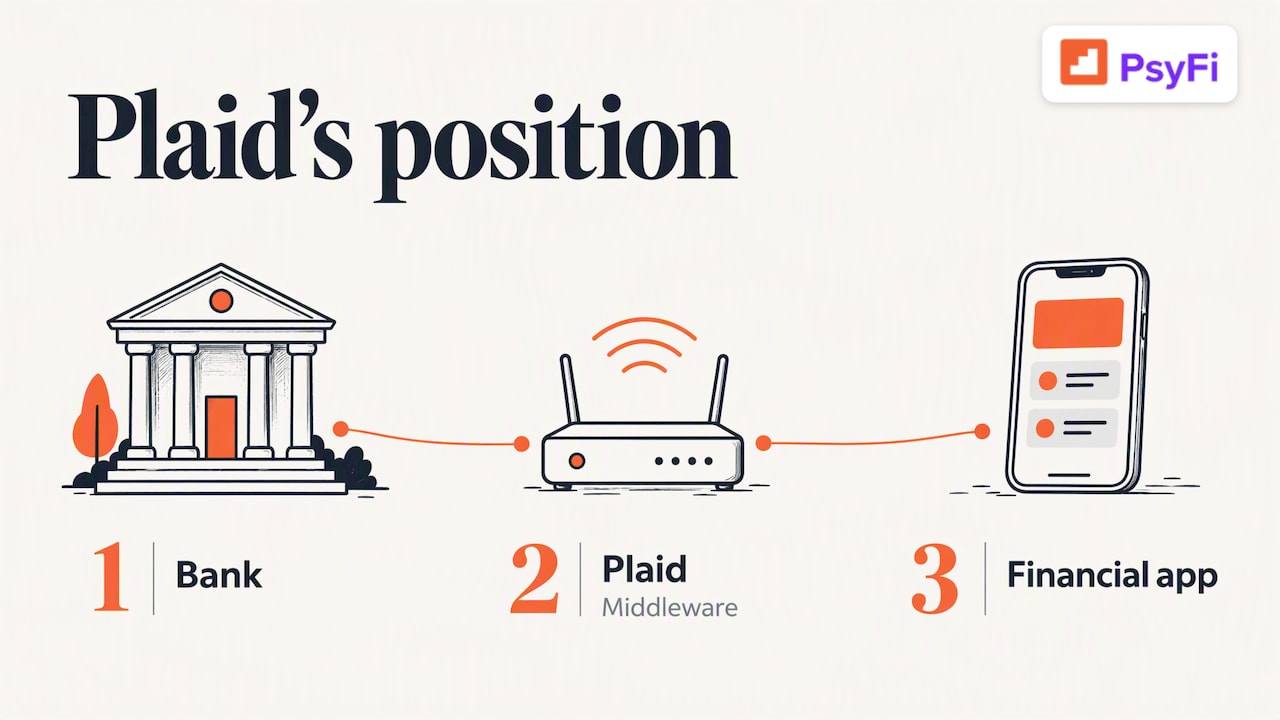
That detail matters. You are not Plaid’s customer. The apps are. So it helps to read Plaid’s promises and the app’s promises separately.
You have probably already used it. Budgeting apps, investing apps and payment apps often use Plaid to confirm your account or pull in your transactions, so you don’t have to type everything in.
What Plaid can and can’t do
A common fear is that connecting Plaid lets someone drain your account. That is not how it is described by Plaid. Plaid’s support center says it connects your accounts to apps but does not hold your money. For transfers, deposits, refunds or cancellations, you deal with the app or service you are using.
What gets shared depends on the app. NerdWallet notes that, depending on the app, Plaid may pass along your name, address, phone number, email, transaction details, account number, routing number and balance.
Question | Short answer |
|---|---|
Does Plaid hold my money? | No. It connects accounts to apps. |
Does Plaid charge me? | No. Apps pay Plaid. |
Can an app see my transactions? | Yes, if you grant that type of data. |
Can an app see my account and routing numbers? | Possibly, depending on what the app requests. |
Who handles refunds or cancellations? | The app or service, not Plaid. |
The takeaway: the risk is mostly about data, not about someone moving your money. Your data is still valuable, so it deserves care.
Do you give Plaid your bank password?
It depends on how your bank connects. Plaid’s support page describes two main routes:
Connection type | What you do | Does Plaid store your credentials? |
|---|---|---|
OAuth | You are sent to your bank’s own site or app to sign in and approve | No |
Non-OAuth | You type your bank username and password into Plaid | Yes |
OAuth is the better route when your bank offers it. You sign in on your bank’s own page, so your password stays with the bank. If you see a screen asking you to enter bank credentials into a Plaid window, you are on the non-OAuth route, and Plaid stores those credentials.
If that makes you uneasy, you can stop and look for another option. Many apps offer one.
How Plaid protects your data
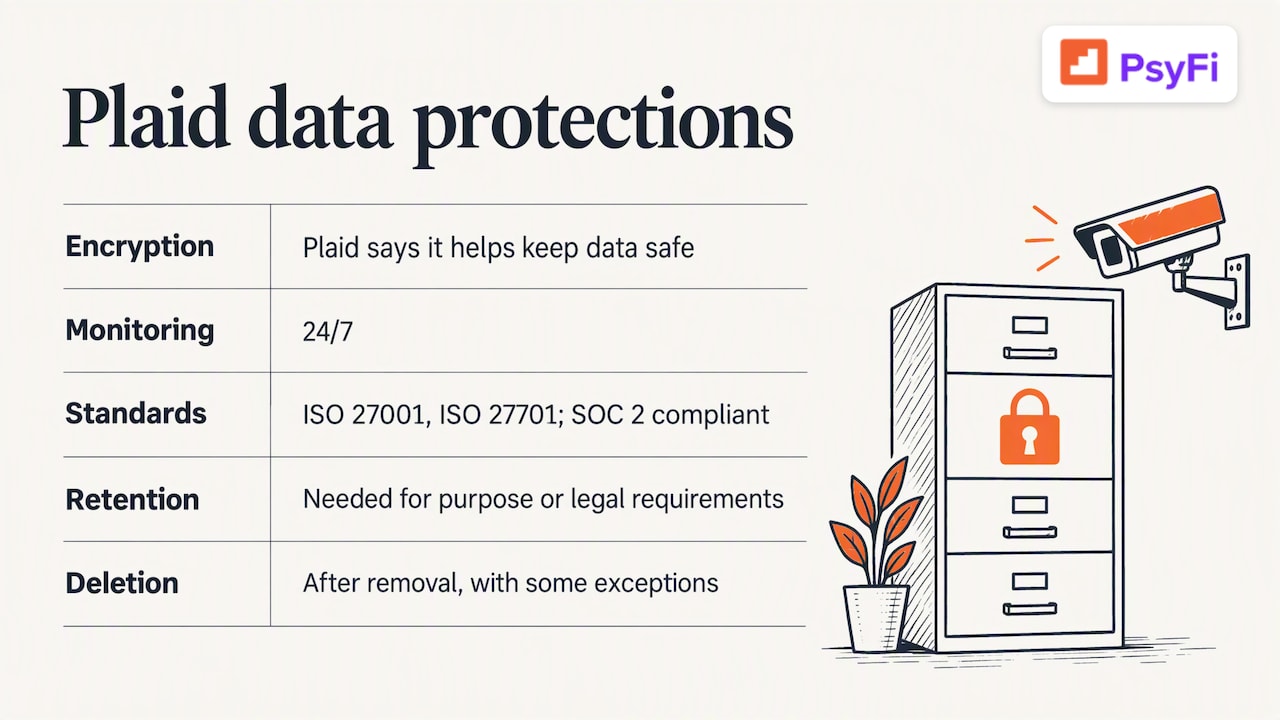
Plaid says it keeps data safe with encryption and 24/7 monitoring. It also states that it is certified in standards such as ISO 27001 and ISO 27701 and is SOC 2 compliant. These are independent security frameworks. They do not guarantee nothing will go wrong, but they show a company is audited against a set of controls.
Plaid also describes how long it keeps information. Its privacy and security policies say it retains data only as long as needed for its purpose or legal requirements. If a developer removes a connection, Plaid’s systems are designed to delete personal data automatically, with some exceptions.
The word “exceptions” is worth noting. Deletion is not always instant or total, which is one reason to use the control tools below.
Has Plaid ever had a security problem?
Yes, and you deserve to know about it.
In April 2026, Plaid disclosed that a phone-number recycling issue may have made some profile information visible to the wrong people. Media reports on the disclosure say it affected 294 people and that bank login credentials were not compromised. The same report says potentially affected data varied and could have included names, birth dates, addresses, driver’s licenses and Social Security numbers.
Here is a fair way to read that:
The number of people affected was small compared with the size of Plaid’s network.
Bank logins were reportedly not part of it.
Identity details can still cause real trouble if they land in the wrong hands, so it is not trivial for the people involved.
No company that holds sensitive data is immune. What you can do is limit how much you share and watch your accounts.
What regulators say about your data
The Consumer Financial Protection Bureau (CFPB) has been working on rules for how third parties use your financial data. Its 2023 proposed rule emphasized consumer control over financial data and protections against misuse by third parties. It was a proposal, so check the CFPB’s site for where the rules stand today.
The broader idea is simple: your data is yours, and you should be able to say yes or no, and change your mind later.
How to see and cut off connections
You are not stuck once you link. NerdWallet reports that the Plaid Portal lets you view some linked accounts and the types of data shared, disconnect apps or services, and delete data stored in Plaid’s systems.
A simple routine:
Open the Plaid Portal and sign in.
Look at the list of connected apps.
Remove any you no longer use or don’t recognize.
Ask any app you’ve dropped to delete your data too. Disconnecting stops new data from flowing, but the app may keep what it already has.
Set a reminder to repeat this a couple of times a year. Old connections from apps you tried once are the most common loose ends.
A checklist before you link any account
The question “is Plaid safe” is only half the picture. The other half is “is this app safe?” Use this table before you connect.
Check | What to look for | Why it matters |
|---|---|---|
The screen you’re on | Did you open the app yourself, or click a link in an email or text? | Scammers copy login screens. |
Connection type | OAuth, where you sign in on your bank’s own page, is preferable | Your password stays with your bank. |
Data requested | Does the app really need account numbers, or only transactions? | Less shared means less exposed. |
Security proof | Recognized audits, such as SOC 2 Type 2 or ISO 27001 | Shows independent review. |
Deletion path | Can you delete your account and data? | Lets you leave cleanly. |
Alternatives | Is there an upload or manual option? | You can skip live linking. |
One more habit helps. Never enter a one-time code or password because someone called or messaged you. Learning to spot phishing and fake login pages is worth the time, and guides on scam protection and cyber security can help you build good habits across your devices.
Our perspective: safe linking is a choice, not a leap of faith
We build a money coaching app, so we ask people to connect accounts every day. We don’t think anyone should do it out of pressure.
Money stress and avoidance often go together. Some people dodge their accounts because looking feels bad. Others link everything at once, hoping an app will fix it, and then worry later about what they gave away. Neither is a failure. Both are human.
Our view is that you should be able to try an app on your own terms. That is why PsyFi works in the US and Canada and connects through Plaid or through document upload. You do not have to hand us a bank login, and you can skip live bank sync entirely if you prefer. Our security page lists our SOC 2 Type 2 audit and ISO 27001 certification, and our Trust Vault gives more detail. If you ever want out, you can delete your account and personal data.
PsyFi offers coaching, not financial advice, and we are not a licensed financial advisor. We help you understand your own patterns, like stress spending or avoiding your balance. We want you to make that choice with your eyes open.
— Maanya Nagpal
Plaid or document upload: which fits you?
Option | Good for | Trade-offs |
|---|---|---|
Plaid link | Automatic, up-to-date transactions | Shares live data with the app and Plaid |
Document upload | People who want more control over what is shared | You upload statements yourself, so it takes a few minutes |
Manual entry | Maximum privacy | Easy to fall behind |
There is no shame in any of these. The best setup is the one you will actually keep using. If you want to see how automatic tracking works in practice, our guide on setting up automatic spending tracking walks through it.
Trying PsyFi
If you want coaching that looks at why you spend the way you do, PsyFi has a 7-day free trial. After that, Premium is $9.99 per month or $69.99 per year. You can connect through Plaid or upload documents instead. You can also look through our features first.
FAQ
Is it safe to give Plaid my bank login?
It can be, but you have a choice in how. With OAuth, you sign in on your bank’s own page and Plaid does not store your credentials. With the non-OAuth route, you type credentials into Plaid and Plaid stores them, so prefer OAuth when you can.
Can Plaid take money from my account?
Plaid’s own support says it connects accounts to apps and does not hold your money. Any transfer or charge would come from the app or service you use, so review what each app is allowed to do.
Has Plaid been hacked before?
Plaid disclosed a 2026 incident involving recycled phone numbers that may have exposed some profile details for 294 people, according to media reports. Those reports say bank login credentials were not compromised. Keep an eye on your accounts and credit if you get a notice.
How do I remove Plaid’s access to my accounts?
Use the Plaid Portal to view connections, disconnect apps and delete stored data. Then contact the app itself and ask it to delete the data it already has.
Should I link my bank account to a budgeting app?
It is a personal call. Linking saves time and gives you accurate numbers, but it is not required. Check the app’s security proof, share only what it needs, and use a document upload if you prefer more control.
Start your 7-day free trial if you want to understand your money habits without feeling pushed to share more than you’re comfortable with.
Sources
Who should I contact about my money or transactions? | Plaid Support
Ways third-party apps can connect to your accounts | Plaid Support
Recommended
This content is provided for general informational and educational purposes only and does not constitute financial, investment, tax, or legal advice. PsyFi provides financial coaching tools and behavioral insights, not regulated advisory services. Always consult with a qualified financial advisor or tax professional regarding your personal situation before making financial decisions.
Keep reading
- Best Budgeting Apps: How to Pick One You’ll Actually Keep UsingCompare the best budgeting apps for 2026 by price, method and fit, from YNAB and Monarch to PsyFi, so you can pick one you will keep using.
- Meta Muse vs PsyFi: AI Money Agent or Money Coach?Meta Muse does money chores for you. PsyFi coaches the habits behind your spending. See how they compare on features, security, pricing and fit.
- Net Worth by Age: What’s Typical and How to Use ItSee median and average U.S. net worth by age from the Federal Reserve, why the two differ, and how to track your own number without shame or stress.