


YNAB Alternatives: Budget Apps That Fit How You Really Spend
Leaving YNAB? Compare Monarch, Copilot, EveryDollar, Goodbudget and PsyFi on price, bank sync and style, so you pick an app you will actually keep using.
By Maanya Nagpal, Co-Founder of PsyFi
The best YNAB alternative is the one that matches why you left. If YNAB felt like too much work, look at simpler apps like EveryDollar or Goodbudget. If you want a full picture of your money, look at Monarch or Copilot. If you keep overspending even when you know your budget, a behavior-focused app like PsyFi may fit better.
None of this means you did anything wrong. Plenty of people find YNAB’s method demanding. Fortune’s review of YNAB points to a steep learning curve and a price that has gone up regularly. Below, we compare real options in plain language, so you can choose without guessing.
Table of Contents
TL;DR
Want zero-based budgeting, but simpler or cheaper: EveryDollar and Goodbudget are the closest matches.
Want a full dashboard with net worth, investments and reports: Monarch and Copilot lead.
Want to change the habit behind the spending, not only record it: PsyFi, the app we make, is built for that.
Prices and free limits change. Check each pricing page before you subscribe. We checked the figures below in October 2026.
Start your 7-day free trial
How we compared these apps
Here are the criteria we used. We chose them because they are the reasons people most often say they leave YNAB.
Effort: how much daily or weekly work the app asks of you.
Cost: the published price and what the free plan includes.
Bank connection: whether it syncs automatically, or whether you can use it without linking accounts.
Method: zero-based, envelope, dashboard or behavior coaching.
Help with habits: whether it only records spending or also helps you change it.
Disclosure: PsyFi makes one of the apps in this list. We have tried to describe every app fairly, and we say where another app is the better fit. We link to no competitor, so check each app’s own site for current details.
Why people leave YNAB
YNAB (You Need a Budget) is a strong tool for people who like to plan every dollar. The reasons people step away are usually practical.
Reason | What it feels like |
|---|---|
Learning curve | The method takes time to learn before it feels natural |
Price | A subscription that has risen over the years, per Fortune |
Hands-on upkeep | Falling behind on categories feels like failing |
Tracking without change | You can see where money went, but not why it keeps going there |
That last one matters most to us. Seeing a number does not always change what you do next. We come back to it in the section from our team below.
If you are just starting out, a softer landing may help. One roundup of beginner apps suggests flexible tracking can be an easier first step before moving to zero-based budgeting.
Zero-based vs. envelope: the two methods in plain words
Before comparing apps, it helps to know the two main styles. NerdWallet groups YNAB and EveryDollar as zero-based, and Goodbudget as envelope.
Method | How it works | Example |
|---|---|---|
Zero-based | You give every dollar of income a job before you spend it | Your $3,000 paycheck is fully assigned: rent, food, savings, fun |
Envelope | You split income into named containers and spend from each | A $400 “groceries” envelope that empties as you shop |
Dashboard | The app pulls in your accounts and shows the full picture | Net worth, trends and reports in one view |
Behavior-based | The app looks for patterns behind your choices and coaches you | Noticing you spend more after stressful weeks |
Zero-based budgeting asks you to assign each dollar before you spend it. Envelopes ask you to allocate money into named spending containers. Both are active styles. A dashboard is more passive. If you want to learn the zero-based style without the app, our guide to a 30 minute zero-based budget walks through it.
YNAB alternatives compared at a glance
Prices below are U.S. prices published for 2026 in the sources linked. They can change, so confirm on each app’s pricing page.
App | Best for | Method | Price (U.S.) | Free plan |
|---|---|---|---|---|
Monarch Money | Full financial picture | Dashboard and customizable budget | No free tier listed in our sources | |
Copilot Money | Polished, automated tracking | Dashboard | None | |
EveryDollar | Beginners who like zero-based | Zero-based | Yes, manual entry | |
Goodbudget | Envelope fans, manual entry | Envelope | Yes, 20 envelopes | |
Rocket Money | Cutting subscriptions and bills | Tracking and bill services | Check its site | Check its site |
PsyFi | Changing habits behind spending | Behavioral coaching | $9.99/month or $69.99/year | 7-day free trial |
Now the detail on each, with pros and cons.
Monarch Money: the full-picture dashboard
Monarch is the app people most often name first when they leave YNAB. CNBC Select describes it as easy to navigate, with syncing to more than 13,000 financial institutions. It also lists forecasting, investment tracking and collaborative household budgeting.
The trade-off is style. CNBC’s comparison suggests Monarch favors a clear, automated view of your whole financial life, while YNAB-style tools favor deliberate, hands-on decisions. Monarch also has an AI assistant that answers questions about your finances.
Pros | Cons |
|---|---|
Wide bank coverage | Costs more per month than several rivals |
Net worth, investments and reports in one place | Answers questions about your data, but is not built around habit change |
Shared goals and household features | More of a dashboard than a coach |
If you are weighing Monarch specifically, we wrote a side-by-side look at a Monarch alternative.
Copilot Money: automation with a clean design
Copilot is a good fit if you want your accounts organized without much manual work. It has no free tier, and it is priced at roughly $95 per year or $13 per month as of 2026.
Pros | Cons |
|---|---|
Automated, low-effort tracking | No free plan |
Modern, easy-to-read design | Less focus on why you spend |
Priced below YNAB’s monthly rate in our sources | Watching a dashboard is not the same as changing a habit |
EveryDollar: zero-based, made simpler
EveryDollar keeps YNAB’s core idea, giving each dollar a job, and trims the setup. NerdWallet calls it a simple zero-based app. The free version needs manual entry. Bank connections come with Premium, which one roundup lists at $79.99 per year or $17.99 per month.
Pros | Cons |
|---|---|
Free tier to try the method | Free tier means typing in every purchase |
Simple layout | Monthly Premium price is the highest in this list |
Good first step into zero-based | Fewer reports than a dashboard app |
Goodbudget: envelopes, with or without a bank link
Goodbudget is hands-on envelope budgeting. It offers 20 free envelopes, and Premium is listed at $80 per year or $10 per month. NerdWallet notes it supports sharing a household budget, and that bank connections come with Premium, while the free version is manual.
Manual entry is a feature for some people. Goodbudget’s own view, as one comparison reports, is that typing in transactions builds mindfulness.
Pros | Cons |
|---|---|
Generous free plan | Manual entry takes time |
Clear envelope method | Bank sync needs Premium |
No bank login needed on free | Less automation than dashboard apps |
Rocket Money: bills and subscriptions first
Rocket Money is less a budgeting method and more a money-saving helper. As of June 2026, it offers a subscription-cancellation concierge and bill negotiation. It suits you if the main problem is recurring charges you forgot about. It is a lighter fit if you want to learn a budgeting method.
Pros | Cons |
|---|---|
Finds and cancels subscriptions | Not built around a budgeting method |
Bill negotiation service | Check its site for current fees and terms |
PsyFi: coaching for the habit behind the budget
PsyFi is our app, so weigh this section with that in mind. Apps like YNAB, Monarch and Rocket Money are very good at showing what you spent. PsyFi starts from a different question: why did you spend it?
It looks at your real financial behavior, spots patterns such as stress spending or avoiding your accounts, and builds a personalized saving and spending plan. FY, our AI coach, then helps in the moment, with a daily check-in and a library of behavioral interventions. Our science is guided by a University of Toronto psychology professor.
Pros | Cons |
|---|---|
Focus on the “why” behind habits | Not a zero-based or envelope tool |
Works with Plaid bank sync or document upload | Built for one person’s habits, with no joint or couples accounts |
Explainable: you stay in control | Gives coaching, not financial advice |
ISO 27001 and SOC 2 Type 2 | Available in the U.S. and Canada only |
$9.99/month or $69.99/year after a 7-day trial |
A few details that matter if you are choosing an app:
Where it works: the United States and Canada.
How it connects: through Plaid, or by uploading documents. No bank login is required.
What it is not: a licensed financial advisor. We offer coaching and education, not personalized investment, tax or legal advice.
You can see everything included on our features page and pricing page. Our security details are in the Trust Vault.
Which app fits which reason for leaving YNAB
If this sounds like you | Consider |
|---|---|
“I want zero-based, but easier” | EveryDollar |
“I like envelopes and typing things in” | Goodbudget |
“I want net worth, investments and reports” | Monarch or Copilot |
“I keep forgetting subscriptions” | Rocket Money |
“I know my budget, but I still overspend or avoid looking” | PsyFi |
You can also mix tools. Some people use a dashboard app for the big picture and a coaching app for the daily habit.
A note from our team
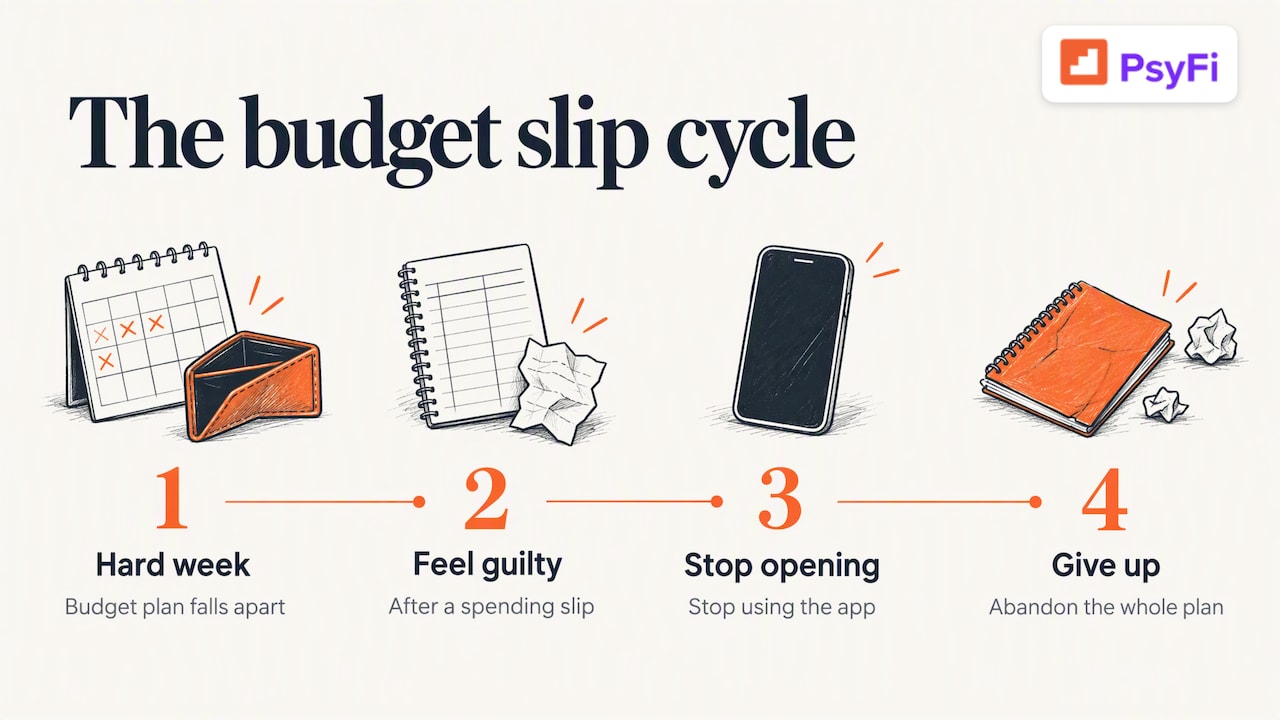
We built PsyFi because we kept seeing the same thing. People can have a perfect budget and still feel stuck. The category says “dining out: $200,” and then a hard week happens, and the plan falls apart. Many people then feel guilty, stop opening the app and drift away from it. That is the “what the hell” effect: once you slip, you give up on the whole plan.
That is not a character flaw. It is a normal human pattern, and it is a design problem for budgeting apps. A tool that only records spending can quietly make it worse by showing you a red number and nothing else.
Our view is that a good money app should do three things. It should find the pattern behind a choice. It should explain what it found in plain words, so you stay in control. And it should help you in the moment, kindly, without shame. That is why we focus on daily check-ins and small behavioral steps. We are not saying budgets don’t work. We are saying a budget works better when the habits under it change too.
If you want to see the gap for yourself, our guide to apps for the intention-action gap explains it in more detail, and our list of apps to stop impulse spending shows the options.
— Maanya Nagpal
How to switch without losing your history
Leaving an app feels like starting over. It does not have to.
Export your data. Most budgeting apps let you download your transactions. Check the settings of the app you are leaving.
Pick one thing to fix. Effort, cost or habits. Choose the app that fixes that one thing.
Start with the free plan or trial. Use it for a few weeks before you cancel the old app.
Link accounts only if you want to. Many apps also take manual entry or uploads.
Set one small goal. Our free savings goal calculator can help you turn a target into a monthly number.
If tracking itself wears you out, these guides may help: how to track expenses without losing your mind and minimalist budgeting.
Try PsyFi if budgeting hasn’t changed your habits
PsyFi costs $9.99 per month or $69.99 per year, and every plan starts with a 7-day free trial. If you want to understand why your money habits look the way they do, you can start on our pricing page and see what is included.
FAQ
What is the best free alternative to YNAB?
Goodbudget and EveryDollar both have free plans. Goodbudget’s free plan includes 20 envelopes, and both free versions use manual entry rather than bank sync, per NerdWallet and one roundup. Free plans can change, so check each app’s site.
Is there a YNAB alternative without linking my bank account?
Yes. Goodbudget’s free version and EveryDollar’s free version rely on manual entry. YNAB itself lets you add or import transactions by hand. PsyFi works through Plaid or document upload, and no bank login is required.
Is Monarch better than YNAB?
It depends on what you want. Monarch leans toward an automated view of your whole financial life, while YNAB leans toward planning ahead and hands-on control, per CNBC Select. Pick Monarch if you want the big picture, and YNAB if you like deciding every dollar.
Is there an AI money coach instead of a budgeting app?
Yes. Monarch has an AI assistant that answers questions about your linked data. PsyFi’s AI coach, FY, goes a step further and coaches you on the habits behind your spending. PsyFi gives coaching, not financial advice.
Can I use PsyFi with a partner?
PsyFi is for individuals and has no couples or joint accounts. Each partner can use it for their own habits and talk about goals together.
Start your 7-day free trial
Sources
Recommended
This content is provided for general informational and educational purposes only and does not constitute financial, investment, tax, or legal advice. PsyFi provides financial coaching tools and behavioral insights, not regulated advisory services. Always consult with a qualified financial advisor or tax professional regarding your personal situation before making financial decisions.
Keep reading
- Mint Alternatives: Apps to Replace Mint and Fit Your HabitsMint is gone. Compare Monarch, YNAB, Empower, Simplifi, Rocket Money, Goodbudget and PsyFi on price, syncing and habit support to find your fit.

- Is Plaid Safe? What It Sees and How to Stay in ControlIs Plaid safe for linking your bank account? See what it can see, what it can't do, its past incidents, and a checklist to stay in control.

- Best Budgeting Apps: How to Pick One You’ll Actually Keep UsingCompare the best budgeting apps for 2026 by price, method and fit, from YNAB and Monarch to PsyFi, so you can pick one you will keep using.