


Best AI Budgeting Apps in Canada: How to Pick One You’ll Keep
Compare AI budgeting apps for Canadians: PsyFi, YNAB, Monarch, Copilot, PocketSmith and more. See criteria, pricing, bank sync, and pros and cons in tables.
The best AI budgeting app in Canada is the one that connects to your Canadian bank, handles Canadian dollars, and fits how you actually behave with money. For most people, that means choosing between a classic budgeting tool like YNAB or Monarch, an AI chat tool like Copilot, or a behavior-focused coach like PsyFi.
By Maanya Nagpal, Co-Founder of PsyFi.
Disclosure: PsyFi makes one of the apps in this comparison. We tell you how we judged every app below so you can check our work. We also explain where another app may suit you better.
Table of Contents
TL;DR
Judge apps on five things: Canadian bank sync, CAD support, what the AI really does, price, and whether it helps you stick with it.
YNAB and Monarch are strong budgeting tools. Copilot adds AI chat but is iOS-only, and its Canadian bank sync can be spotty, according to one 2026 comparison.
PsyFi focuses on the why behind your habits, like stress spending or avoiding your accounts. It works in the US and Canada, connects through Plaid or document upload, and needs no bank login.
Always use the free trial first. A budget you quit in a month is not a budget.
Start your 7-day free trial
How we ranked the apps
A “best” list means little without the rules behind it. Here are ours. They come from what Canadians tend to get stuck on, not from what looks good in an app store.
Criterion | Why it matters for you |
|---|---|
Canadian bank connection | If transactions don’t sync, the smart features have nothing to work with. |
Canadian dollar (CAD) support | Some US apps default to US dollars and make CAD reports confusing. |
What the AI actually does | “AI” can mean a chat box, a forecast, or personal coaching. These are very different. |
Price and trial | You should know the cost and be able to test it before paying. |
Help sticking with it | The best plan is the one you still use in month four. |
Privacy and security | You are sharing sensitive data, so you need to know how it is handled. |
We did not run lab tests. We used published information about each app and the sources linked in this article. Prices and features change, so confirm them on each app’s own page before you subscribe.
What “AI” means in a budgeting app
Most apps now say they use AI. In practice, it falls into three groups.
Smart sorting and suggestions. The app sorts your transactions and suggests savings. Monarch and YNAB sit here, based on this 2026 comparison.
AI chat and forecasting. You ask questions in plain words and get answers, forecasts, and alerts about odd charges. Copilot offers AI chat, forecasting, and anomaly detection, per the same comparison.
Behavioral coaching. The app looks for patterns in your own data and helps you change the habit behind them. This is what we build at PsyFi.
None of these is “right.” They answer different problems. If your problem is not knowing where the money went, a tracker is enough. If your problem is knowing and doing it anyway, you need something that deals with habits.
The apps compared
Here is a quick view of the main options for Canadians. Prices are the US dollar prices listed in a 2026 Canadian comparison, except PsyFi, which is our own published price. Check each company’s pricing page for today’s figure.
App | What it does best | Price listed | Free trial |
|---|---|---|---|
PsyFi | Behavioral coaching, daily check-in, personalized plans | US$9.99/month or US$69.99/year | 7 days |
YNAB | Zero-based budgeting, hands-on control | US$14.99/month or US$109/year | 34 days |
Monarch Money | Category budgets, net worth, household view | US$14.99/month or US$99.99/year | 7 days |
Copilot | AI chat, forecasting, subscription tracking | Check Copilot’s page | Check Copilot’s page |
PocketSmith | Cash flow forecasting | Check PocketSmith’s page | Check PocketSmith’s page |
Goodbudget | Simple envelope budgeting | Has a free version | Free tier |
The trial lengths and the YNAB and Monarch prices come from the wealthnorth comparison. The Goodbudget free version is noted by CPABC, a Canadian accounting body, in its 2024 review.
Pros and cons at a glance
App | Pros | Cons |
|---|---|---|
PsyFi | Looks at why you spend, not just what. Daily check-in. Library of behavioral interventions. Works with Plaid or document upload, so no bank login is needed. | Built for individuals only, with no shared or couples accounts. It offers coaching, not financial advice. |
YNAB | Zero-based budgeting gives every dollar a job. Long 34-day trial. Manual entry keeps you engaged. | Takes regular attention. Not designed to coach the emotions behind spending. |
Monarch Money | Automated category budgets, net worth tracking, and a household view. | More of a dashboard than a coach. Check CAD handling and your bank’s sync first. |
Copilot | AI chat, forecasting, anomaly detection, subscription tracking. | iOS-only. Canadian bank sync can be spotty, per this comparison. |
PocketSmith | Forecasting tools that show where your cash flow is heading. | Forecasting is the focus, so day-to-day habit support is lighter. |
Goodbudget | Free version available. Simple envelope style. | Basic compared with AI-driven apps. |
Note that we did not claim any app is “worse.” Each one wins on at least one of the criteria above.
Which one fits your situation
Your money story matters more than a feature list. Here is a simple way to match the two.
If this sounds like you | Look at |
|---|---|
You like control and don’t mind regular upkeep | YNAB |
You want one dashboard for budgets and net worth | Monarch Money |
You like asking questions in plain language, and you use an iPhone | Copilot |
You want to see your cash flow months ahead | PocketSmith |
You want a free, simple start | Goodbudget |
You stress-spend, avoid your accounts, or quit other apps | PsyFi |
If you used Mint, you are not alone. Mint shut down on March 23, 2024, and YNAB and Monarch are among the common places former users went. Moving on is a good moment to ask what didn’t work last time, not just which logo to pick next.
Check these before you subscribe in Canada
A lot of budgeting apps were built for the US first. Run through this list during your free trial.
Does it connect to your bank? Most apps reach Canadian institutions through Plaid or a direct connection, but coverage of credit unions and online banks varies.
Does it support CAD? US-market apps may default to USD, which can make reports confusing.
Is the connection reliable? One 2026 review argues that syncing is the bottleneck for AI features. If transactions don’t arrive, forecasts and insights get weak.
Is your phone supported? Copilot, for example, is iOS-only.
How do you cancel? Find the cancellation steps before you pay, and set a reminder for the day your trial ends.
Privacy and bank connections
Sharing bank data feels risky, and it is fair to ask questions. Reputable apps use read-only access, which means they can view transactions but cannot move money. A 2024 CPABC review found the apps it covered use 128-bit or 256-bit encryption, with YNAB at 128-bit and the others at 256-bit.
For PsyFi, here is how it works. We work in the US and Canada. You can connect through Plaid or upload documents instead. No bank login is required. We are ISO 27001 certified and SOC 2 Type 2 audited. You stay in control of what the app sees.
Why habits matter more than features
Most people don’t quit a budget because they can’t do math. They quit because the budget makes them feel judged, or because one overspend makes the whole month feel lost. Psychologists sometimes call that the “what the hell” effect: once you slip, you decide you may as well keep going.
This is why some apps ask you to enter spending by hand. YNAB intentionally includes manual entry to keep you engaged with your spending, unlike “set it and forget it” apps. That works for many people. It can feel like a chore for others, especially if looking at your accounts already makes you anxious.
Two useful questions to ask yourself:
Do I avoid my accounts, or do I check them and then spend anyway?
Do I want a system I manage, or a coach that points out patterns for me?
Neither answer is a flaw. It just tells you which type of app to try first. Some AI tools in other fields also work by spotting personal patterns, such as behavioral pattern analysis tools that combine daily check-ins with data from connected accounts. The idea is the same one behind money coaching: your own data tells a story that general rules can’t.
Our perspective: fix the why, not just the budget
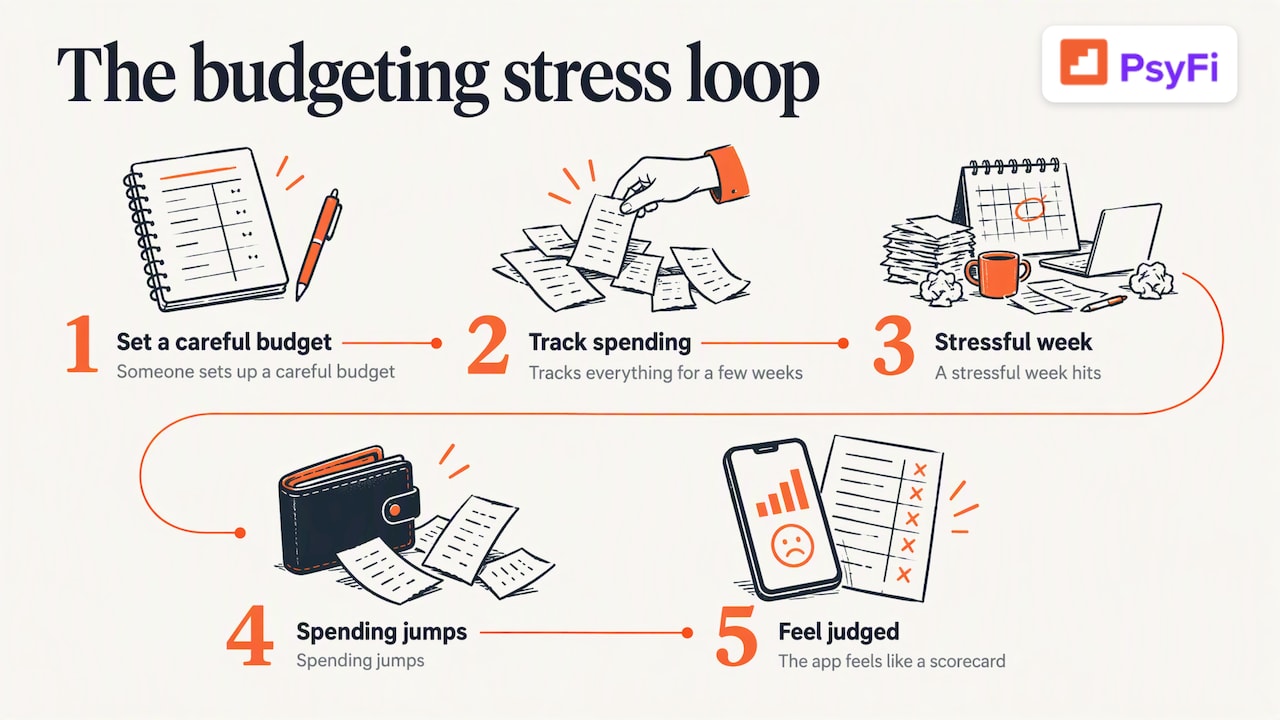
We built PsyFi because we kept seeing the same loop. Someone sets up a careful budget. They track everything for a few weeks. Then a stressful week hits, spending jumps, and the app starts to feel like a scorecard they are failing.
Apps like YNAB, Monarch, and Rocket Money are good at showing what you spent. We think the missing piece is why. Is it stress, boredom, a bad week at work, or avoiding the numbers entirely? Once you can see the trigger, you can change the habit instead of fighting yourself.
That is how PsyFi is designed. Our patent-pending AI looks at your real financial behavior and spots patterns and biases, like stress spending or avoidance. Our AI coach, FY, then helps you adjust in real time. You get a daily check-in and a library of behavioral interventions, and the plan is built on your data, not generic rules. Our science is guided by a University of Toronto psychology professor.
Two things we want to be clear about. PsyFi is coaching, not financial advice, and we are not a licensed financial advisor. And PsyFi is for individuals: each person uses it for their own habits, even if they share a household with a partner.
— Maanya Nagpal
How to test an app without wasting a month
A free trial is only useful if you use it well. Try this plan with any app on the list.
Day | What to do | What you are checking |
|---|---|---|
1 | Connect one bank account, or upload a statement | Does it work with your Canadian institution? |
2 to 3 | Look at how your transactions are sorted | Is the sorting right, and are amounts in CAD? |
4 to 5 | Set one small goal, such as a savings amount | Is it easy to set up, and does it feel doable? |
6 | Open the app on a stressful or busy day | Do you still want to use it when you’re tired? |
7 | Decide, and set a reminder before billing | Do you feel supported or judged? |
If you want a simple starting point first, our free finance calculators can help you see a number before you commit to any app. For ideas on setting up tracking, see our guide on automatic spending tracking and our tips for picking a budgeting app you’ll keep. If you’re weighing Monarch in particular, we also wrote about a smart alternative to Monarch Money.
Trying PsyFi
If you want coaching on your habits and not another spreadsheet, PsyFi is built for that. Premium is US$9.99 per month or US$69.99 per year, and you can start with a 7-day free trial. Prices are in US dollars. You can connect through Plaid or upload documents, and no bank login is needed.
What to remember about price
Price matters, but it is not the whole story. Based on the listed figures above, the annual plans work out like this.
App | Annual price listed (USD) | Rough monthly equivalent |
|---|---|---|
PsyFi | US$69.99 | About US$5.83 |
Monarch Money | US$99.99 | About US$8.33 |
YNAB | US$109 | About US$9.08 |
The monthly equivalents are simple division, not a quoted price. Prices for YNAB and Monarch are from the October 2026 comparison and may have changed. An app you pay for and don’t open costs more than a pricier one you use every day.
FAQ
What is the best AI budgeting app in Canada?
There is no single winner, because it depends on your problem. YNAB suits hands-on budgeters, Monarch suits people who want a dashboard, and PsyFi suits people who want coaching on habits like stress spending. Compare them on bank sync, CAD support, price, and how well they help you stick with it.
Does PsyFi work in Canada?
Yes. PsyFi works in the US and Canada. You can connect through Plaid or upload documents, and no bank login is required.
Are budgeting apps safe to connect to my bank?
Reputable apps use read-only access, so they can see transactions but cannot move money. Apps in a CPABC review use 128-bit or 256-bit encryption. Check each app’s security page, and look for independent audits such as SOC 2.
I used Mint. What should I try now?
Mint shut down on March 23, 2024, and many former users moved to YNAB or Monarch. If your old budget faded because it felt like a chore or a scorecard, try a coaching-style app like PsyFi during a free trial and see how it feels.
Is PsyFi financial advice?
No. PsyFi offers coaching on your habits, not personalized investment, tax, or legal advice, and we are not a licensed financial advisor. For decisions about investing, taxes, or legal matters, talk to a qualified professional.
Ready to stop repeating the same money loop?
If you’re tired of budgets you quit, let your own data show you why. Start your 7-day free trial
Sources
Recommended
This content is provided for general informational and educational purposes only and does not constitute financial, investment, tax, or legal advice. PsyFi provides financial coaching tools and behavioral insights, not regulated advisory services. Always consult with a qualified financial advisor or tax professional regarding your personal situation before making financial decisions.
Keep reading
- Daily Spending Limit: How to Set One That Fits Your LifeA daily spending limit is a number you choose for everyday spending. Learn how to set one after bills and savings, track it, and tell it from a bank limit.

- Windfall Money: How to Make a Plan Before You Spend ItGot a bonus, refund, inheritance or settlement? Here is a plain-language plan for windfall money: what to do first, how taxes work, and how to split it.

- Monarch vs YNAB: Which Budgeting App Fits the Way You Handle Money?Monarch is a broad money dashboard and YNAB is a hands-on every-dollar budget. Compare prices, trials, features and fit, plus where PsyFi comes in.