

Is Bank Account Linking Safe? What Apps See and How to Control It
Linking a bank account to a budgeting app can be done safely. Learn what apps can see, how secure links work, and how to cut off access any time.
Linking a bank account to a budgeting app is generally safe when the link uses a secure, token-based connection and you know how to turn it off. The risk is not the linking itself. It is sharing your bank username and password, and forgetting which apps still have access.
By Maanya Nagpal, Co-Founder of PsyFi
If the idea makes you nervous, that is a reasonable reaction. Your bank account holds your whole financial life. This guide explains, in plain words, how linking works, what an app can see, what to check first and how to cut off access later. It is general education, not personal financial, legal or tax advice.
TL;DR
Secure links (called APIs) use a token, so the app never sees your bank password. Screen scraping, where an app logs in as you, carries more risk.
Apps can typically see balances, transactions and account numbers. You can often limit which accounts you share.
Before you link, check what data is shared, for how long, whether it can be sold and how you revoke access.
Deleting an app does not always end data sharing. Revoke access in your bank’s security settings too.
Checking statements and turning on bank alerts catches problems early.
Table of Contents
How bank account linking works
When you link an account, your budgeting app usually does not talk to your bank directly. A middle company, called a data aggregator, does the connecting. Plaid, Finicity and MX are well-known examples.
The Federal Reserve Bank of Kansas City describes the flow in four steps:
Step | What happens |
|---|---|
1 | You give the app permission to get your data. |
2 | The app asks the aggregator for it. |
3 | The aggregator pulls the data from your bank. |
4 | The aggregator sends it back to the app. |
The Congressional Research Service notes these transfers usually go through data aggregators that verify the information and connect it to authorized third parties, such as a budgeting app showing all your balances in one place. This system is often called open banking.
Two ways to connect, and why the difference matters
This is the most important idea in the whole topic. There are two main ways an aggregator can reach your account.
FINRA, the securities industry’s self-regulator, explains both methods. With an API, you approve access without sharing your security credentials, and you can limit the scope. With screen scraping, you hand over your login and an automated “robot” signs in and collects information.
API or token connection | Screen scraping | |
|---|---|---|
What you share | Permission, not your password | Your bank username and password |
How the app gets in | A token tied to specific data | A robot logs in as you |
Scope | Can be limited to certain data | Often the whole account view |
Where credentials live | With you and your bank | Stored by the aggregator |
Risk level | Lower | Higher |
Law firm Davis Wright Tremaine explains that an API token covers a specific set of data without exposing your login, while scraping puts your entire financial record at the aggregator’s disposal. The OpenID Foundation’s security standard for financial APIs calls screen scraping insecure because it works by impersonating you through password sharing.
FINRA adds that the risks of fraud, unauthorized transactions and identity theft are especially high with scraping aggregators, which store shared credentials in one place and may face limited oversight.
A simple way to remember it: you want the secure window, not the shared password.
What an app can actually see
Seeing “all your data” sounds scary, so let’s be specific. PNC’s guidance says aggregators that receive login credentials can download balances, account numbers, transactions and statements.
Chase’s education page adds that budgeting apps may also collect personal details like name, email and phone, plus device information such as model, operating system and IP address.
Data type | Examples | Why an app wants it |
|---|---|---|
Account data | Balances, account numbers | Show your net worth and cash on hand |
Transaction data | Amount, date, location | Sort and track spending |
Personal data | Name, email, phone | Create and secure your profile |
Device data | Phone model, IP address | Spot suspicious logins |
None of this is a reason to feel ashamed or foolish for wanting an app to help with money. It is simply the trade: more data gives the app more to work with, so it is worth deciding how much you are comfortable sharing.
The real risks, in plain words
Chase says linking is generally safe because most budgeting apps use encryption, two-factor authentication and data-handling policies. It also names two risks: a data breach could expose financial information, and a lost or stolen phone could lead to fraudulent use of the app.
Here is how those risks look in everyday life:
Risk | What it means for you | What reduces it |
|---|---|---|
Data breach at an app or aggregator | Your data could be exposed | Choose token-based links and tight data limits |
Shared passwords | One leak can open your bank account | Avoid sharing your bank login |
Lost or stolen phone | Someone could open your app | Phone lock, strong app password, two-factor sign-in |
Forgotten connections | Old apps keep pulling data | Review and revoke linked apps |
Unclear data use | Your data could be shared or kept longer than you expect | Read what the app says before linking |
The CFPB, the federal consumer financial watchdog, makes a point many people miss: there is no standard way for services to disclose how they use your data, so reading the terms matters.
A checklist before you link an account
FINRA and the CFPB suggest a set of questions. They fit neatly into a table you can run through in a few minutes.
Question to ask | Why it matters |
|---|---|
Which data is shared, with whom, for how long and why? | You should control scope and purpose. |
Can the data be sold? | Sale of your data is a privacy decision. |
Is the data encrypted? | Encryption protects it in storage and transit. |
How long is data kept after you revoke access? | Good practice is to purge it. |
Does the service store your login? | Stored credentials are a bigger target. |
Can it move money, or only read data? | Read-only access is lower risk. |
What happens if there is a breach or an error? | You want a clear way to dispute problems. |
These come from FINRA’s guidance and the CFPB’s consumer advice. If an app’s answers are hard to find, that is useful information too.
How to link more securely
Here is a routine you can follow with any app.
Use your bank’s own secure window when you can. Chase, for example, says you log in directly at its secure page without sharing your username and password with the app, and you choose which accounts to share.
Share only what you need. If an app only needs your checking account to track spending, skip the rest.
Turn on two-factor sign-in at your bank. PNC recommends one-time passcodes for online and mobile banking, and never reusing the same password across sites.
Turn on bank alerts. Text or email alerts on every bank, investment and credit card account help you spot odd activity quickly.
Lock your phone. A passcode or biometric lock protects the app if your phone goes missing.
Put a reminder in your calendar. Review linked apps a couple of times a year.
What if you would rather not link at all?
Some people never feel comfortable with a live connection, and that is a fair choice. Some apps let you upload statements instead. PsyFi works in the US and Canada, connects through Plaid or document upload, and does not require your bank login. If you want to see how other tools handle this, our guide to budgeting apps without bank sync walks through the options, and our explainer on what Plaid sees and how to stay in control covers the most common connector in detail.
How to check and revoke what is already linked
Most people have linked an app or two years ago and forgotten. That is normal, and fixable.
The CFPB states that deleting an app from your phone does not stop data sharing, and even changing your bank password may not always cut off a service. It recommends a separate, strong password for each financial account and using your bank’s tools that show which services can reach your data.
Consumer Reports lists where to find those tools at big banks. Menu names change, so treat these as starting points:
Bank | Where to look |
|---|---|
Bank of America | Security Center, then Third-Party Site Access |
Chase | Security & Privacy Center, then Linked apps |
Citi | Profile, then Apps with Account Access |
Wells Fargo | Control Tower, then Monitor Data Sharing |
Chase’s data-sharing page confirms you can remove access any time through Linked apps. If your bank is not listed, look in its security or privacy settings for “connected apps” or “data sharing.”
Consumer Action suggests a simple reset for the unsure: take an inventory of linked apps, change your bank password so none can log in on your behalf, then reconnect only the ones you actively use.
If something looks wrong
An unfamiliar charge does not mean you did something wrong. Here is what to do:
Step | Action |
|---|---|
1 | Report any transaction you do not recognize to your bank right away, as the CFPB advises. |
2 | Change your online banking password and user ID. |
3 | Revoke access for apps you do not recognize or no longer use. |
4 | Turn on alerts and keep checking statements for unauthorized debits. |
5 | Reconnect only the apps you actively use. |
For suspected identity theft or a data exposure, contact your bank’s fraud team directly. They can tell you what protections apply to your accounts.
What U.S. rules say about data access
The rules are still moving, so here is the short version. In November 2024 the CFPB finalized a Personal Financial Data Rights rule. It requires banks and card issuers to share covered data through standardized, secure interfaces, bars compliance through screen scraping and bans fees for data access, with compliance dates phased in from April 1, 2026 to April 1, 2030 depending on institution size.
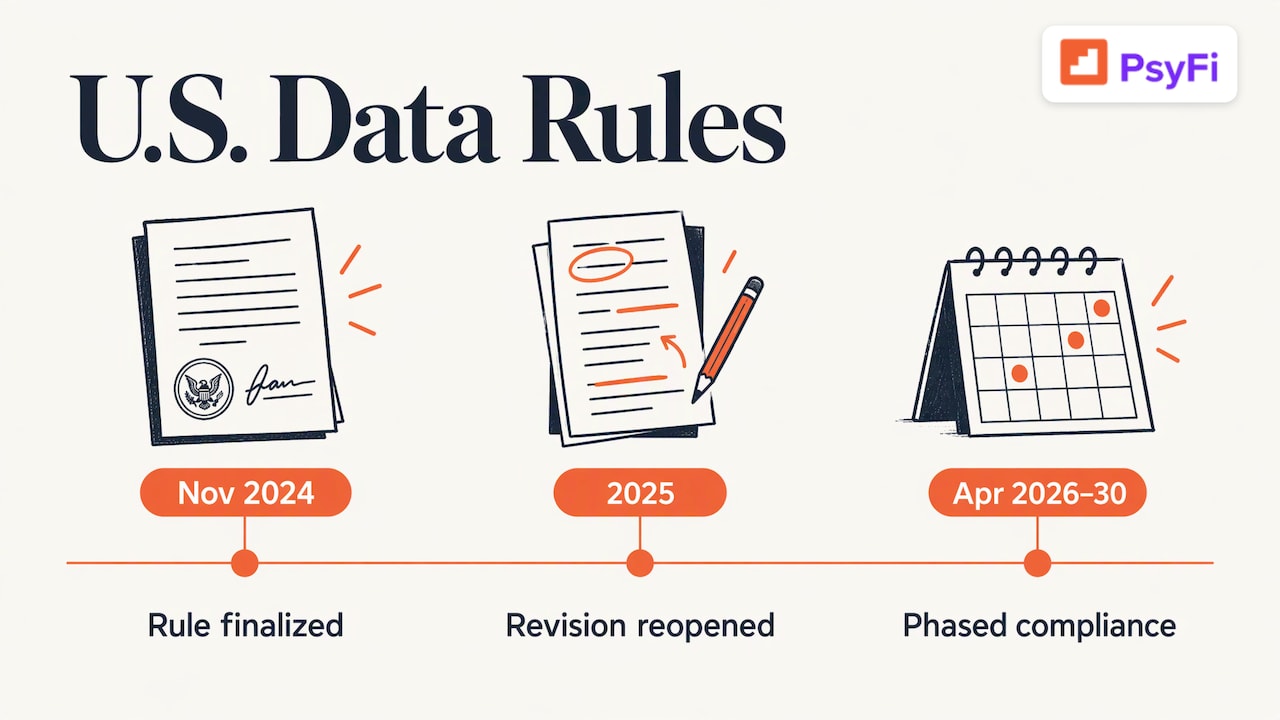
Then things shifted. According to law firm Goodwin, the CFPB moved in 2025 to revise the rule substantially and reopened questions on who can access your data, fees, data security and privacy. Because that process is ongoing, check the CFPB’s website for what applies now. The takeaway for you: the direction of travel is away from password sharing and toward secure, permissioned access, so choosing token-based links today fits where things are heading.
Our view on safe linking
Money stress often makes people avoid their accounts, and fear of linking can become one more reason to look away. We understand that. We also think the answer is not blind trust or total avoidance. It is informed control.
That means knowing what an app sees, choosing connections that do not expose your bank password and being able to turn access off whenever you want. It also means an app should explain itself in plain language.
At PsyFi, we build for individuals. Our app works in the US and Canada, connects through Plaid or document upload and does not require your bank login. We are ISO 27001 certified and SOC 2 Type 2 audited, and you can read the details on our security page. We offer coaching, not financial advice, and we use your own data to help you understand the why behind your money habits.
Safety and progress go together. When you feel in control of your data, it is easier to open the app, look at your numbers and make one small change.
Maanya Nagpal
Where PsyFi fits
If you are ready to try a budgeting and coaching app that explains how it handles your data, PsyFi uses your own financial behavior to spot patterns like stress spending or avoiding your accounts, then coaches you through a daily check-in. Premium is US$9.99 per month or US$69.99 per year, after a 7-day free trial. See pricing and features for details.
FAQ
Is it safe to link my bank account to a budgeting app?
It is generally safe when the app uses encryption, two-factor authentication and a token-based connection instead of your bank password. Risks include data breaches and a lost phone, so use a phone lock and bank alerts. Review linked apps from time to time.
Is account aggregation safe?
Account aggregation can be safe when it uses APIs, which let you share data without sharing your login. Screen-scraping versions carry more risk because credentials are stored and used to sign in as you. Ask which method an app uses before you link.
Does deleting a budgeting app remove its access to my bank account?
Not always. The CFPB says deleting an app does not stop data sharing. Revoke the connection in your bank’s security or linked apps settings as well.
Do I have to give a budgeting app my bank password?
Not with a secure token-based link, where you sign in at your bank’s own window. Some apps use document upload instead of a live link. PsyFi, for example, does not require your bank login.
What should I do if I see a charge I do not recognize?
Report it to your bank right away, change your online banking password and revoke apps you do not recognize. Then keep watching your statements and alerts. This is not a sign you did anything wrong.
Feeling stuck between avoiding your money and sharing too much?
Get clear on your money habits with a 7-day free trial, and decide how much to connect at your own pace.
Sources
The Safety of Linking Bank Accounts with Budgeting Apps, Chase
Know Before You Share: Be Mindful of Data Aggregation Risks, FINRA
Data Aggregators: The Connective Tissue for Open Banking, Federal Reserve Bank of Kansas City
Access to Consumer Financial Data: Open Banking, Congressional Research Service
Open Banking, APIs, and Liability Issues, Davis Wright Tremaine
Recommended
This content is provided for general informational and educational purposes only and does not constitute financial, investment, tax, or legal advice. PsyFi provides financial coaching tools and behavioral insights, not regulated advisory services. Always consult with a qualified financial advisor or tax professional regarding your personal situation before making financial decisions.
Keep reading
- Open Banking in the USA: What It Is and How to Connect SafelyOpen banking in the USA lets you share bank data with apps you choose. Learn how it works, what rules apply, and how to stay in control of every connection.
- Copilot Money Alternatives: Find an App That Changes Your HabitsLooking for Copilot Money alternatives? Compare Monarch, YNAB, PocketGuard, Rocket Money and PsyFi on price, setup, privacy and habit coaching.

- Best Money Habit Apps: How to Pick One That Changes Your Habits