


Copilot Money Alternatives: Find an App That Changes Your Habits
Looking for Copilot Money alternatives? Compare Monarch, YNAB, PocketGuard, Rocket Money and PsyFi on price, setup, privacy and habit coaching.
By Maanya Nagpal, Co-Founder of PsyFi
The best Copilot Money alternative depends on what you want the app to do. If you want more control over a budget, look at Monarch or YNAB. If you want to understand why you overspend or avoid your accounts, PsyFi is built for that. We make PsyFi, so we say that up front and show our criteria below.
You may be leaving Copilot because of the price, because you don’t have an Apple device, or because tracking spending never changed what you do. All three are fair reasons. None of them is a failure on your part.
Table of Contents
TL;DR
Copilot Money costs $13 a month or $95 a year and runs on iPhone, iPad and Mac only, according to that review of its pricing.
Monarch, YNAB and PocketGuard are the closest matches if you want tracking, budgets and reports.
PsyFi is the pick if your trouble is behavior: stress spending, avoiding your accounts, or quitting budget apps after a few weeks. It costs US$9.99 a month or US$69.99 a year after a 7-day free trial.
Whatever you choose, check how it connects to your accounts and what it does with your data.
Start your 7-day free trial
How we ranked these apps
We judged each app on five things. You can weigh them differently, and that is the point.
Main job: does it track, budget, or coach?
Cost: what the plans run for a year.
Devices: where you can use it.
Account connection and privacy: how it gets your data, and whether you must hand over a bank login.
Habit support: does it help you change what you do, or only show you what happened?
PsyFi is our product. Please read the comparison with that in mind. We describe the other apps fairly, and prices belong to each company, so check its own pricing page before you subscribe. Prices change often.
Why people look for something other than Copilot Money
Copilot Money is a polished tracker. It pulls in your accounts and shows where your money went. For many people that is enough.
Three things usually push people to look elsewhere:
Reason | What it looks like |
|---|---|
Cost | A $13 monthly price, or $95 a year if you pay annually, with no permanent free tier. |
Devices | It is listed as iPhone, iPad and Mac only, so Android users are left out. |
Habits | A clear chart of last month’s spending does not tell you why you spent it, or how to spend differently. |
The third reason matters most for many people. Seeing the number can feel like a lecture. If you tend to avoid your accounts when money is tight, a prettier dashboard may make you open the app less, not more.
Copilot Money alternatives compared
Here is the short version. Details on each app follow.
App | Best for | Approach | Devices | Price notes |
|---|---|---|---|---|
PsyFi | Changing habits and understanding why you spend | Behavioral coaching with an AI coach | App | US$9.99/month or US$69.99/year, 7-day free trial |
Monarch | Detailed budgets, rules and reports | Tracking and budgeting | Web and mobile | Paid subscription, check its pricing page |
YNAB | Giving every dollar a job | Zero-based budgeting | Web and mobile | About $109 a year, check its pricing page |
PocketGuard | A simple “safe to spend” view | Connected accounts and spending view | Mobile | Free and paid tiers, check its pricing page |
Rocket Money | Finding subscriptions to cancel | Bill and subscription tools | Mobile | Free and paid tiers, check its pricing page |
Prices were last confirmed in 2026. Companies change them, so treat the table as a starting point.
PsyFi: for the why behind your habits

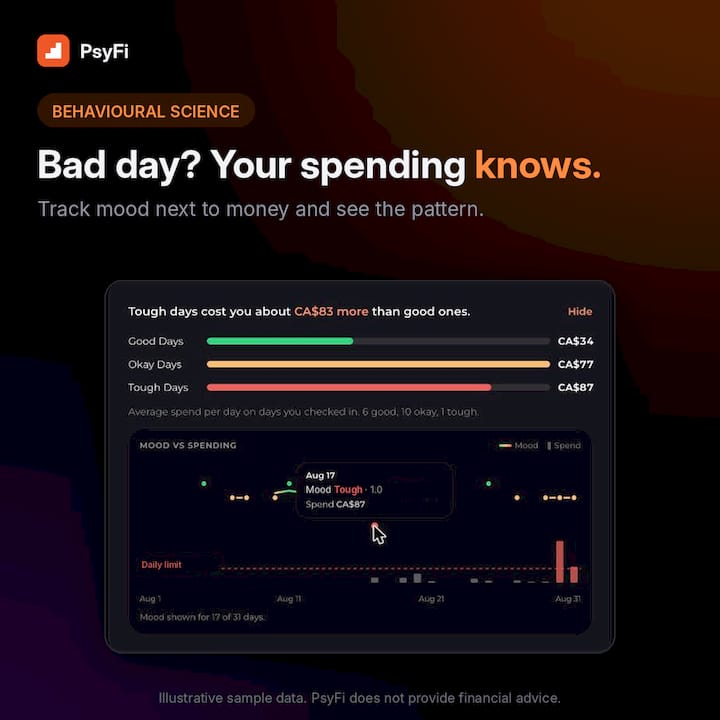
Most apps track what you spent. PsyFi uses your own data and behavioral science to look for the patterns behind it, such as stress spending or avoiding your accounts. FY, our AI coach, then helps you change the habit as it happens. You get a daily check-in, a personalized saving and spending plan, and a library of behavioral interventions.
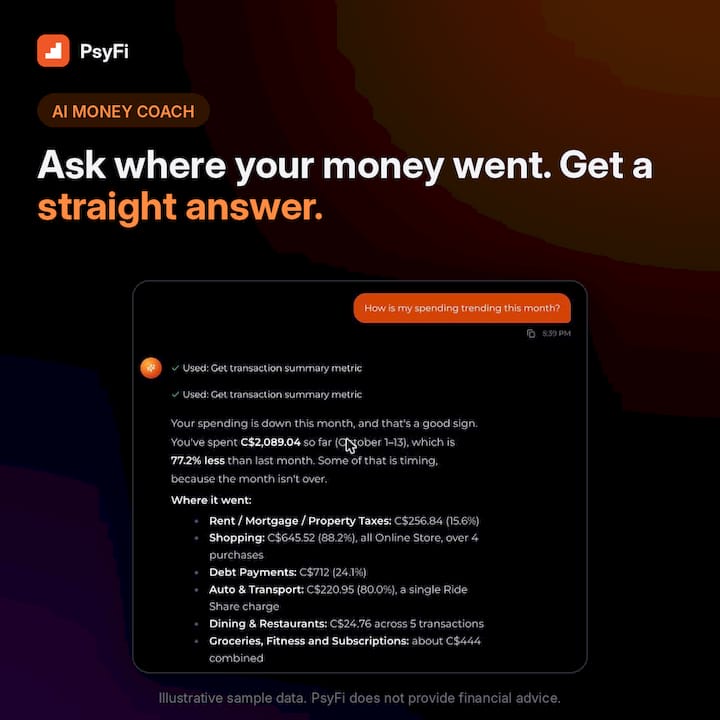
Our science is guided by a University of Toronto psychology professor. The app is ISO certified and SOC 2 Type 2 audited. It is coaching, not financial advice, and PsyFi is built for one person’s own habits.
Monarch: for control and reporting
Monarch is a good fit if you like building rules, categories and reports. People who enjoy working in the numbers often prefer it. It is a tracker first, so it will not explain your habits for you. Our Monarch vs YNAB comparison goes deeper on how each one feels day to day.
YNAB: for hands-on budgeters
YNAB asks you to give every dollar a job. It works well if you want to plan each month on purpose and you have the time. If you tried it and stopped, you are far from alone, and we wrote about YNAB alternatives for exactly that moment.
PocketGuard: for a simple spending view
PocketGuard connects your accounts and shows what is left to spend after bills and goals. It keeps things light. That can suit you if you want a quick glance, not a full budget system.
Rocket Money: for bills and subscriptions
Rocket Money is known for finding recurring charges you may want to cancel. If your main goal is trimming bills, it is worth a look. We cover it in our Rocket Money alternatives guide.
Pros and cons at a glance
App | Pros | Cons |
|---|---|---|
PsyFi | Finds the patterns behind spending; real-time coaching from your own data; works by Plaid sync or document upload; US and Canada | Built around coaching, so it is less focused on detailed rules and custom reports |
Monarch | Deep reports and rules; flexible categories | More setup; tracks what happened more than why |
YNAB | Clear method; strong planning habit | Takes regular time and effort; easy to abandon in a busy month |
PocketGuard | Simple and quick to read | Less depth for people who want detailed control |
Rocket Money | Helpful for subscriptions and bills | Narrower focus than a full habit tool |
We have not claimed anything about these apps beyond what each is known for. If one feature decides it for you, read that app’s own page.
Which one fits you?
Pick by the problem you want solved, not by the longest feature list.
If this sounds like you | Look at |
|---|---|
“I know what I spend. I can’t stop.” | PsyFi |
“I avoid opening my accounts.” | PsyFi |
“I want rules, reports and full control.” | Monarch |
“I like planning every dollar.” | YNAB |
“I just want to see what’s safe to spend.” | PocketGuard |
“I want to cut subscriptions.” | Rocket Money |
If you quit a budget app before, that does not mean you are bad with money. It often means the method asked for more than you had that month. Our guide to budgeting apps you will actually keep and our list of financial coaching apps can help you choose.
What to check before you connect your accounts
Most budgeting apps need to see your transactions. Here is what to compare.
Question | Why it matters |
|---|---|
How does it connect? | Some use a data connector such as Plaid. Others let you upload statements. |
Does it need your bank login? | Fewer logins shared means fewer places your password can go. |
Which countries does it support? | Some apps work only in the US. |
What security checks does it have? | Look for named audits, such as SOC 2 Type 2. |
Can you see why it gives each tip? | Explainable advice keeps you in control. |
PsyFi works in the US and Canada. It connects through Plaid bank sync or document upload, and no bank login is required. If you would rather not link accounts at all, see our list of budgeting apps without bank sync.
Your data rights are changing
In the US, a federal rule gives you more say over your financial data. The CFPB’s personal financial data rights rule says banks and other covered providers must make your data available to you and to third parties you authorize, in a usable electronic form. Provider compliance dates begin April 1, 2026 and phase in through April 1, 2030, depending on provider size. The CFPB says the goal is to help people compare providers and switch when one isn’t serving them.
It also matters when something in your records is wrong. If an error is hurting your access to banking, a guide on how a ChexSystems report can block a bank account explains how that happens.
How to switch without losing momentum
Moving apps feels like starting over. These steps keep it small.
Step | What to do | Watch out for |
|---|---|---|
1 | Export or screenshot what you want to keep, such as categories and your current budget numbers | Not every app lets you move history, so plan to rebuild what you need |
2 | Pick the one problem you want fixed | Choosing by features alone leads to feature shopping |
3 | Start a free trial before you cancel the old plan | Keep both for a short overlap so nothing is lost |
4 | Connect your accounts or upload statements | Share only what the app needs |
5 | Cancel the old subscription | Check your renewal date, especially on annual plans |
Your full past history may not carry over, and that is okay. What helps most is the next few weeks of honest data, not years of old charts.
If you want a target to aim at, the free Savings Goal Calculator turns a goal into a monthly amount.
Where PsyFi fits
PsyFi has one plan. After the 7-day free trial it is US$9.99 a month or US$69.99 a year. You can see what is included on our pricing page and features page.
It includes spending and net worth dashboards, habit tracking, account analysis, free finance calculators, and daily insights based on your own patterns. If you can already track your spending but can’t change it, that gap is what we built PsyFi to close. Our guide to apps for the intention-action gap explains it in more detail.
Our perspective
We built PsyFi because most money apps answer the question “what did I spend?” and stop there. Most of the people we talk to already know. What they want to know is why they keep doing it.
Stress spending, avoiding your accounts, and the “what the hell” effect, where one slip makes you give up the whole plan, are not character flaws. They are patterns, and patterns can be seen and changed.
That is why PsyFi looks at your own behavior and gives you coaching in the moment, not a generic rule. You stay in control, and you can see the reasoning. It is coaching, not financial advice.
Pick the tool that matches your problem. If your problem is habits, we would be glad to help.
Maanya Nagpal
FAQ
What is the closest app to Copilot Money?
Monarch and PocketGuard are the closest in style, since all three focus on connected accounts and spending views. If you want the same kind of clean tracking plus coaching on your habits, PsyFi adds that layer.
Is there a free alternative to Copilot Money?
Some apps offer free tiers with fewer features. PsyFi offers a 7-day free trial, then a paid plan, and its calculators at psyfiapp.com/tools are free to use. Always check a free tier’s limits on the company’s own page.
Is there a Copilot Money alternative for Android?
Copilot is listed as iPhone, iPad and Mac only. Monarch, YNAB and other apps offer broader device support, so check the app store for the current list.
Do I need to give an app my bank login?
Not always. PsyFi connects through Plaid or lets you upload documents, and no bank login is required. It works in the US and Canada.
Can I move my Copilot Money history to a new app?
Sometimes only part of it moves, and it depends on the app. Plan to keep what you need, such as your category list and goals, and let the new app build fresh history.
Start your 7-day free trial
PsyFi offers coaching and education, not personalized investment, tax or legal advice, and is not a licensed financial advisor.
Sources
Recommended
This content is provided for general informational and educational purposes only and does not constitute financial, investment, tax, or legal advice. PsyFi provides financial coaching tools and behavioral insights, not regulated advisory services. Always consult with a qualified financial advisor or tax professional regarding your personal situation before making financial decisions.
Keep reading
- Is Bank Account Linking Safe? What Apps See and How to Control ItLinking a bank account to a budgeting app can be done safely. Learn what apps can see, how secure links work, and how to cut off access any time.

- Open Banking in the USA: What It Is and How to Connect SafelyOpen banking in the USA lets you share bank data with apps you choose. Learn how it works, what rules apply, and how to stay in control of every connection.

- Best Money Habit Apps: How to Pick One That Changes Your HabitsCompare the best money habit apps in the US: budgeting, tracking and AI coaching, with ranking criteria, pros and cons, and how to match an app to your habits.