

Mint Alternatives in Canada: Apps That Fit How You Spend
Mint is gone, and Canadians have real options. Compare five budgeting apps on bank sync, price and habit change, and see which fits how you spend.
The best Mint alternative for you depends on what you want from an app: tracking, a strict budgeting method, or a way to change habits. If you want help with the why behind your spending, PsyFi is the one we built for that, and it works in the US and Canada.
By Maanya Nagpal, Co-Founder of PsyFi
If Mint was your home base, losing it can feel like starting over. That’s a normal reaction, and it isn’t a sign you were doing money wrong. Below, we compare five options on clear criteria so you can pick one and keep using it.
Disclosure: PsyFi makes one of the apps in this article. We’ve tried to describe every app fairly, and we tell you the criteria we used.
Table of Contents
TL;DR
Mint no longer exists as a budgeting app, so you need a new home for your spending data. Pick based on what you need: tracking, a budgeting method, or habit change.
If you spend on stress, avoid opening your accounts, or keep quitting budgets, PsyFi is built to find the reason behind the habit and coach you through it.
Before you connect any app, check where it works (US, Canada or both), how it connects to your bank, and what it does with your data.
PsyFi costs $9.99 per month or US$69.99 per year, with a 7-day free trial. It works in the US and Canada.
Start your 7-day free trial
How we ranked these apps
We used five criteria. You may care about some more than others, so we state them up front.
Criterion | Why it matters to you |
|---|---|
Works in Canada | Some apps were built for US banks first. You need one that handles your accounts. |
How it connects | Bank sync, document upload, or manual entry each have trade-offs for privacy and effort. |
Main job | Tracking, budgeting method, bill management, or habit change. They are different jobs. |
Price | A subscription only helps if you will still pay for it in month three. |
Staying power | The best app is the one you keep opening, especially on hard money weeks. |
These are our criteria, based on what people tell us they miss after quitting an app. Yours may differ, and that’s fine.
What Mint did, and what to replace
Mint pulled your accounts into one screen, sorted your transactions into categories and showed where your money went. Most of the apps below replace that part well. Fewer help with what happens next: you see the number, feel a knot in your stomach, and close the app.
So ask yourself which gap you want to fill:
I want to see everything in one place. You need a tracker with strong account linking.
I want rules for every dollar. You need a budgeting method.
I want to stop the same pattern from repeating. You need coaching built on your own data.
Many people quit Mint-style apps not because the charts were wrong, but because seeing spending didn’t change it. Naming that early helps you choose.
Five Mint alternatives compared
The table shows the main job of each app. It is a general picture, not a feature-by-feature audit. Prices and plans change, so check each company’s own pricing page for the current amount before you subscribe.
App | Best known for | Pros | Cons |
|---|---|---|---|
PsyFi | Behavioral coaching on your own data | Looks for patterns like stress spending or avoiding your accounts. Daily check-in. Bank sync through Plaid or document upload. US and Canada. Individuals only. | Built for personal habit change, so it is not a joint-account tool. Coaching, not financial advice. |
Monarch Money | Full-picture tracking | Brings accounts, budgets and net worth into one dashboard. Familiar feel for former Mint fans. | Focused on tracking what you spent rather than coaching the reason behind it. |
YNAB | A strict budgeting method | Gives every dollar a job. Works well if you like rules and enjoy hands-on budgeting. | Takes regular manual effort. People who dislike detailed upkeep often drop it. |
Rocket Money | Bills and subscriptions | Helps you spot recurring charges you may want to cancel. | Centered on bills and subscriptions, not on why you spend. |
Wealthica | Canadian investment tracking | Popular with Canadians who hold accounts at several institutions and want to see them together. | Stronger for investment views than for day-to-day habit change. |
We describe the other apps by their main focus only. For current plans and prices, go to each company’s own site.
If you want tracking and a net worth view
Monarch and Wealthica both aim to give you the big picture. Monarch is a general budgeting and tracking app. Wealthica is often chosen by Canadians who want investment accounts and bank accounts side by side. If you mostly miss the Mint dashboard, these are natural places to look.
If you’re weighing Monarch in more depth, our guide to Monarch Money alternatives lays out how it compares.
If you want a budgeting method
YNAB is built around a method: you decide what each dollar is for before you spend it. Some people love that clarity. Others find the upkeep heavy and stop after a few weeks. If you’ve tried it and quit, you’re not alone, and it says nothing about your discipline. See our notes on YNAB alternatives if that’s you.
If you want to control bills
Rocket Money is known for finding subscriptions and recurring bills. If your main worry is charges you forgot about, it targets that. Our page on Rocket Money alternatives goes further.
If you want to change the habit
This is where PsyFi fits. Our AI engine, which is patent-pending, looks at your real financial behavior and spots patterns and biases, like stress spending or avoiding your accounts. It then builds a personalized saving and spending plan. Our AI coach, FY, gives you real-time coaching, and there’s a daily check-in plus a library of behavioral interventions. Our science is guided by a University of Toronto psychology professor.
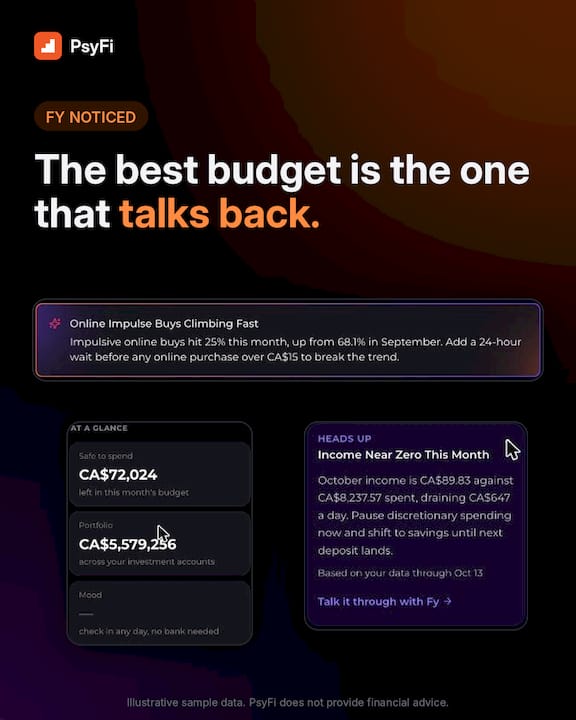
A simple example: you notice your food delivery orders jump after hard workdays. A tracker shows the total. A coach helps you see the trigger and try a different response the next time that evening arrives.
Which one fits you
Use this table as a quick match.
If this sounds like you | Look at |
|---|---|
I miss seeing all my accounts on one screen | Monarch or Wealthica |
I like rules and a hands-on method | YNAB |
I’m worried about forgotten subscriptions | Rocket Money |
I stress-spend, avoid my accounts, or keep quitting budgets | PsyFi |
I feel overwhelmed and don’t know where to start | PsyFi |
Nothing here says one choice is wrong. A tracker is a good tool when you only need a view. A coach is a good tool when the view hasn’t been enough.
Want more comparisons? Our guides to the best budgeting apps, spending tracker apps and AI budgeting apps in Canada go deeper. We also keep a wider list of Mint alternatives.
What to check before you link your accounts
Any app that reads your accounts needs your trust. Before you connect, check these four things.
Check | What to look for |
|---|---|
Where it works | Does it support your country and your banks? PsyFi works in the US and Canada. |
How it connects | Many apps use a connector like Plaid. PsyFi connects through Plaid or document upload. |
Whether you must share a bank login | With PsyFi, no bank login is required. You can upload documents instead. |
Security standards | PsyFi is ISO 27001 certified and SOC 2 Type 2 audited. |
It also helps to know your rights. In the US, the Consumer Financial Protection Bureau (CFPB) finalized a rule on personal financial data in October 2024. It says that third parties must limit data collection to one year under an authorization and get a new one to continue. After you revoke access, they must stop collecting and stop using or keeping your data, unless it is still reasonably necessary to provide the service you asked for. The CFPB’s executive summary explains this. This is a US rule, and it is general education, not legal advice. Our guide to open banking in the USA walks through connecting safely.
If you’re an American living abroad and juggling accounts in two countries, this roundup of budgeting apps for Americans abroad may also help you compare.
A simple way to switch without starting over
Moving apps feels big. Break it into small steps.
Step | What to do | Where people get stuck |
|---|---|---|
1 | Export or save any history you want from your old app while you can. | Waiting until you feel ready. Do it first, even if you won’t use it soon. |
2 | Pick the one job you most need done: see, plan or change. | Choosing on features instead of need. |
3 | Connect one or two main accounts, not everything. | Linking all accounts at once and feeling buried. |
4 | Use the app for a week and note which moments you open it. | Judging yourself for gaps. Gaps are information. |
5 | Set one small goal, such as a savings amount you can keep up. | Setting a goal so big it feels like failure. |
To size a first goal, our savings goal calculator is free. It’s general education, not personal advice.
Our perspective
Most budgeting apps answer “where did my money go?” That’s a useful question, and for a long time it was the only one on offer.
What we hear from people who quit apps is different. They saw the numbers and still felt stuck. Money isn’t only math. It’s stress, habits, avoidance and the “what the hell” effect: you overspend once, feel bad, and decide the whole plan is ruined.
That’s why we built PsyFi around the why. We look at your own behavior, find the pattern, and coach you in the moment, without shame. You stay in control, and the coaching is explainable, so you can see what it’s based on.
PsyFi is for individuals. If you share money with a partner, each of you can use it for your own habits.
Maanya Nagpal
Where PsyFi fits
PsyFi is an AI financial wellness app with behavioral coaching, a daily check-in, account linking and analysis, spending and net worth dashboards, and free calculators. Premium is $9.99 per month or US$69.99 per year, and every plan starts with a 7-day free trial. See the pricing page or the features page, or compare it with other financial coaching apps. PsyFi offers coaching, not financial advice, and it isn’t a licensed financial advisor.
FAQ
Is there a Mint equivalent for Canadians?
Yes, there are several, and they differ in focus. Some track accounts, some teach a budgeting method, and PsyFi coaches the habits behind your spending. PsyFi works in the US and Canada.
Does YNAB work for Canadians?
YNAB is a budgeting method you can follow with your own numbers, and many Canadians use it. It asks for regular upkeep, so check how it connects to your bank and what the current price is on YNAB’s own site. If you quit it before, that doesn’t mean you did anything wrong.
Do I have to give an app my bank login?
Not with PsyFi. It connects through Plaid or document upload, and no bank login is required. Whatever app you choose, look at how it connects and which security standards it meets before you link anything.
What should I look for in a Mint replacement?
Start with what you need: a view of your accounts, a budgeting method, or help changing habits. Then check country support, how it connects, price and whether you can see yourself opening it daily. An app you keep using beats a perfect one you drop.
Is PsyFi financial advice?
No. PsyFi offers coaching based on your own data and behavioral science, not financial advice, and it is not a licensed financial advisor. For investment, tax or legal questions, speak with a licensed professional.
Start your 7-day free trial
Sources
Recommended
This content is provided for general informational and educational purposes only and does not constitute financial, investment, tax, or legal advice. PsyFi provides financial coaching tools and behavioral insights, not regulated advisory services. Always consult with a qualified financial advisor or tax professional regarding your personal situation before making financial decisions.
Keep reading
- Paycheck Budgeting: Give Each Paycheck a Plan So Bills Get PaidLearn how paycheck budgeting works, how to set up a biweekly plan, and what to do in three-paycheck months, with tables and a simple template.

- Cleo Alternatives: Apps That Fix Money Habits, Not Just Cash GapsLooking for a Cleo alternative? Compare cash advance, budgeting and AI coaching apps by what they fix, how they link accounts and what to check first.

- Budget App for Young Professionals: How to Choose One You’ll Keep